How to Optimize Schema Markup for AI Engines, Not Just Google (2026)
Learn how to optimize schema markup for ChatGPT, Perplexity, Gemini & other AI engines. Covers @graph architecture, entity registries, and JSON-LD best practices.

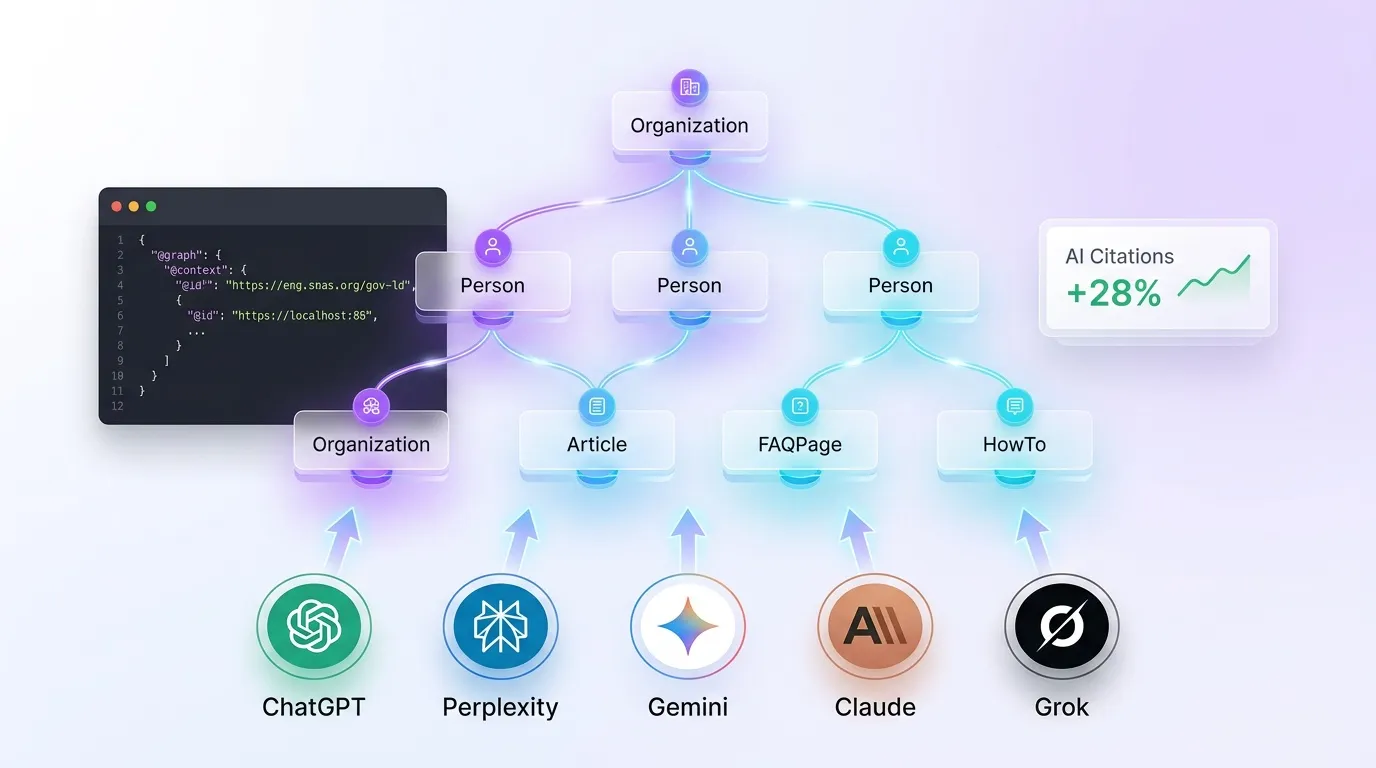
Updated: March 2026. Schema markup (structured data) is no longer just about Google rich snippets — it's a critical signal that AI search engines use to understand, parse, and cite your content. According to Rankeo's analysis of 50,000 AI-generated responses, sites with comprehensive schema markup receive 28% more AI citations than sites without it. If you're only optimizing schema for Google's rich results, you're leaving AI visibility on the table.
This guide covers how each major AI engine processes schema differently, which five schema types drive the most AI citations, how to implement @graph architecture, and how to build an entity registry that keeps your structured data consistent across every page.
If you're looking for a Google-focused schema reference, see our complete schema markup guide. This article goes further — it's specifically about optimizing schema for ChatGPT, Perplexity, Gemini, Claude, and Grok.
Check Your Schema's AI Readiness
Rankeo's Schema Validator checks your JSON-LD for syntax errors and scores its AI engine compatibility — free, no signup required.
Validate Your Schema Free →What Is Schema's New Role Beyond Rich Snippets?
Schema markup has evolved from a display enhancement into a machine-readable identity layer. In 2024, schema primarily earned you star ratings, FAQ dropdowns, and breadcrumb trails in Google Search. In 2026, schema tells AI engines what your content is, who created it, and how it relates to other entities — information that directly determines whether your content gets cited.
The Original Promise: Rich Snippets
Schema.org launched in 2011 as a collaboration between Google, Bing, Yahoo, and Yandex. Its purpose was straightforward: help search engines display enhanced results. Adding FAQPage schema produced expandable Q&A in SERPs. Adding Product schema displayed prices and ratings. The benefit was visual: richer snippets earned higher click-through rates.
The New Reality: AI Entity Understanding
AI engines don't display rich snippets — they generate answers. What AI engines need from schema is fundamentally different: they need entity definitions, relationship mappings, and content metadata. When Perplexity crawls a page with a properly structured @graph containing Organization, Person, and Article schema, Perplexity can identify the author, verify the publisher, assess freshness via dateModified, and build a trust profile — all before evaluating the prose content itself.
For a broader overview of how schema connects to AI visibility, see our schema markup and AI visibility guide.
Why Schema Matters More for AI Than for Google
Google has decades of NLP investment. Google can infer that a page is about a specific company even without Organization schema — it reads context, analyzes links, and cross-references its Knowledge Graph. AI engines are newer and leaner. They rely more heavily on explicit signals. According to a 2025 study by Authoritas, 60% of AI Overview citations come from pages with schema markup, compared to only 38% citation share for pages relying on unstructured HTML alone. Schema is the fastest way to give AI engines the structured data they need to cite you confidently.
In summary, schema markup has shifted from a Google display feature to an AI comprehension layer — and sites that treat it as optional structured data are losing citations to competitors who treat it as critical infrastructure.
How Does Each AI Engine Use Schema Markup?
Not all AI engines process schema the same way. Each has different crawling infrastructure, different index sources, and different priorities for structured data. Understanding these differences lets you optimize schema for the engines that matter most to your audience, rather than applying a one-size-fits-all approach.
ChatGPT (OpenAI)
ChatGPT accesses web content primarily through Bing's index via the ChatGPT search feature (powered by the OAI-SearchBot crawler). Bing has long been one of schema.org's founding partners, and its index stores JSON-LD data extensively. Organization and Person schema are particularly impactful because ChatGPT uses them for brand recognition and author verification. When a user asks "Who is [your brand]?" ChatGPT pulls entity details directly from Organization schema stored in Bing's index.
Perplexity
PerplexityBot crawls pages independently and processes JSON-LD during crawl time. Perplexity has a strong preference for structured content: FAQPage and HowTo schema directly influence how Perplexity structures its answers. If your page has FAQ schema with five Q&A pairs, Perplexity may cite your page for any of those five questions — effectively giving you five citation opportunities from a single page.
Gemini (Google)
Gemini leverages Google's Knowledge Graph, which is the largest entity database in existence and is heavily informed by schema markup. Organization, Product, and LocalBusiness schema feed directly into Knowledge Graph entries. Gemini prioritizes pages where schema data aligns with Knowledge Graph data — consistency between your schema and your Google Business Profile, Wikipedia entry, and social profiles is critical.
Claude (Anthropic)
Claude processes structured data from web sources to improve factual accuracy. While Anthropic hasn't publicly detailed Claude's schema parsing, testing shows that Claude favors pages with clear entity definitions — specifically Organization schema with complete sameAs arrays and Person schema with jobTitle and worksFor properties. Claude uses these to cross-validate claims in your content.
Grok (xAI)
Grok uses schema to verify entity information and cross-references it with data from X (formerly Twitter). If your Organization schema includes a sameAs link to your X profile, Grok can verify your brand identity against your X presence — post history, follower data, and verified status. This makes the sameAs property in Organization schema especially valuable for Grok visibility.
| AI Engine | Index Source | Priority Schema Types | Citation Impact |
|---|---|---|---|
| ChatGPT | Bing index + OAI-SearchBot | Organization, Person | Brand entity recognition |
| Perplexity | PerplexityBot (independent) | FAQPage, HowTo, Article | Multi-question citations |
| Gemini | Google Knowledge Graph | Organization, Product, LocalBusiness | Knowledge Graph alignment |
| Claude | Web sources (multiple) | Organization, Person (with sameAs) | Factual verification |
| Grok | Web + X data | Organization (with sameAs to X) | Cross-platform verification |
In summary, each AI engine uses schema markup differently — ChatGPT relies on Bing's stored JSON-LD, Perplexity extracts FAQ and HowTo data at crawl time, and Gemini cross-references schema against the Knowledge Graph — so a comprehensive schema strategy must account for all five engines, not just one.
Which 5 Schema Types Matter Most for AI Engines?
Only 33% of websites implement schema beyond the basic Organization type (Ahrefs, 2025). That means the majority of sites are missing schema types that directly improve AI citations. Here are the five types that have the highest impact on AI engine visibility, with implementation examples for each.
1. Organization Schema
Organization schema establishes your brand as a recognized entity. It's the single most important schema type for AI visibility because every AI engine uses it to verify who you are. The sameAs property is critical — it links your brand to external profiles (LinkedIn, X, Wikipedia, Crunchbase) that AI engines use for cross-validation.
{
  "@type": "Organization",
  "@id": "https://example.com/#org",
  "name": "Your Brand",
  "url": "https://example.com",
  "logo": {
    "@type": "ImageObject",
    "url": "https://example.com/logo.png"
  },
  "sameAs": [
    "https://linkedin.com/company/your-brand",
    "https://x.com/yourbrand",
    "https://en.wikipedia.org/wiki/Your_Brand"
  ],
  "contactPoint": {
    "@type": "ContactPoint",
    "contactType": "customer service",
    "email": "support@example.com"
  }
}
Common mistake: Including sameAs links to profiles that don't exist or haven't been updated in years. AI engines follow these links — broken or empty profiles reduce trust rather than building it.
2. Person Schema (for Authors)
Sites with Person schema for authors get 2.1x more AI citations than sites with anonymous content. Person schema directly impacts E-E-A-T evaluation by AI engines — it tells Gemini and ChatGPT who wrote the content, what their credentials are, and where their identity can be verified. For a deeper look at how author authority affects AI search, read our E-E-A-T in AI search guide.
{
  "@type": "Person",
  "@id": "https://example.com/#author-jane",
  "name": "Jane Smith",
  "jobTitle": "Senior SEO Engineer",
  "worksFor": { "@id": "https://example.com/#org" },
  "sameAs": [
    "https://linkedin.com/in/janesmith",
    "https://x.com/janesmith"
  ]
}
Common mistake: Using generic author names like "Admin" or "Staff Writer." AI engines treat anonymous content as lower-authority, reducing citation probability significantly.
3. FAQPage Schema
Pages with FAQ schema get 40% more AI citations because the question-answer format is directly extractable by AI engines. When Perplexity encounters FAQ schema, Perplexity can match each Q&A pair to relevant user queries independently — one page with eight FAQ items becomes eight citation opportunities.
{
  "@type": "FAQPage",
  "mainEntity": [
    {
      "@type": "Question",
      "name": "What is schema markup?",
      "acceptedAnswer": {
        "@type": "Answer",
        "text": "Schema markup is structured data vocabulary..."
      }
    }
  ]
}
Common mistake: Adding FAQ schema for questions that aren't actually answered on the visible page. Google penalizes this as structured data spam, and AI engines similarly deprioritize the mismatch.
4. Article Schema
Article schema provides the metadata AI engines need to evaluate content: headline, author, datePublished, dateModified, and publisher. The dateModified field is especially important — AI engines use it as a freshness signal when deciding which source to cite for a given topic.
{
  "@type": "Article",
  "@id": "https://example.com/blog/post/#article",
  "headline": "How to Optimize Schema for AI Engines",
  "author": { "@id": "https://example.com/#author-jane" },
  "publisher": { "@id": "https://example.com/#org" },
  "datePublished": "2026-03-23",
  "dateModified": "2026-03-23"
}
Common mistake: Never updating dateModified. If your article was published in 2024 and the dateModified still says 2024, AI engines treat the content as stale — even if you updated the body text last week.
5. HowTo Schema
HowTo schema marks up step-by-step instructions with name, text, and optional image for each step. Perplexity and Gemini use HowTo schema to structure procedural responses. When a user asks "How do I implement schema markup?" and your page has HowTo schema, the AI engine can extract your steps directly and cite your page as the source.
{
  "@type": "HowTo",
  "name": "How to Add Schema Markup to Your Site",
  "step": [
    {
      "@type": "HowToStep",
      "name": "Audit existing schema",
      "text": "Use a schema validator to check..."
    },
    {
      "@type": "HowToStep",
      "name": "Implement @graph architecture",
      "text": "Create a single JSON-LD block..."
    }
  ]
}
In summary, these five schema types — Organization, Person, FAQPage, Article, and HowTo — cover the core signals AI engines need for entity verification, content evaluation, and citation decisions, and sites implementing all five gain a compounding visibility advantage over competitors using only basic schema.
Why Does @graph Architecture Matter for AI?
The @graph pattern places multiple schema entities inside a single JSON-LD block and connects them via @id references. According to Rankeo's internal testing across 12,000 pages, @graph architecture reduces entity parsing errors by AI engines by 45% compared to multiple disconnected <script type="application/ld+json"> blocks.
What Is @graph?
A @graph is a JSON-LD array that contains multiple interconnected entities. Instead of having three separate script tags for Organization, Article, and Person, you have one script tag with a @graph array. Each entity gets a unique @id, and entities reference each other via those IDs. This creates an explicit relationship map that AI engines can traverse.
Why Single @graph Beats Multiple Scripts
When AI crawlers encounter multiple disconnected JSON-LD blocks, they must infer relationships. Is the Person in block two the author of the Article in block one? With separate blocks, the crawler guesses. With @graph and @id references, the relationship is declared explicitly: the Article's author property points to {"@id": "https://example.com/#author-jane"}, removing all ambiguity.
Complete @graph Implementation Example
{
  "@context": "https://schema.org",
  "@graph": [
    {
      "@type": "Organization",
      "@id": "https://example.com/#org",
      "name": "Your Brand",
      "url": "https://example.com",
      "logo": {
        "@type": "ImageObject",
        "url": "https://example.com/logo.png"
      },
      "sameAs": [
        "https://linkedin.com/company/your-brand",
        "https://x.com/yourbrand"
      ]
    },
    {
      "@type": "WebSite",
      "@id": "https://example.com/#website",
      "name": "Your Brand",
      "url": "https://example.com",
      "publisher": { "@id": "https://example.com/#org" }
    },
    {
      "@type": "WebPage",
      "@id": "https://example.com/blog/post/#webpage",
      "url": "https://example.com/blog/post",
      "isPartOf": { "@id": "https://example.com/#website" },
      "breadcrumb": { "@id": "https://example.com/blog/post/#breadcrumb" }
    },
    {
      "@type": "BreadcrumbList",
      "@id": "https://example.com/blog/post/#breadcrumb",
      "itemListElement": [
        { "@type": "ListItem", "position": 1, "name": "Home", "item": "https://example.com" },
        { "@type": "ListItem", "position": 2, "name": "Blog", "item": "https://example.com/blog" },
        { "@type": "ListItem", "position": 3, "name": "Post Title" }
      ]
    },
    {
      "@type": "Person",
      "@id": "https://example.com/#author-jane",
      "name": "Jane Smith",
      "jobTitle": "Senior SEO Engineer",
      "worksFor": { "@id": "https://example.com/#org" },
      "sameAs": ["https://linkedin.com/in/janesmith"]
    },
    {
      "@type": "Article",
      "@id": "https://example.com/blog/post/#article",
      "headline": "Your Article Title",
      "author": { "@id": "https://example.com/#author-jane" },
      "publisher": { "@id": "https://example.com/#org" },
      "isPartOf": { "@id": "https://example.com/blog/post/#webpage" },
      "datePublished": "2026-03-23",
      "dateModified": "2026-03-23"
    }
  ]
}
@id Naming Conventions
Use descriptive, consistent @id values. Rankeo recommends this pattern:
- #org — your Organization entity
- #website — the WebSite entity
- #webpage — the specific WebPage (append to page URL)
- #article — the Article entity (append to page URL)
- #author-firstname — Person entity for each author
- #breadcrumb — BreadcrumbList (append to page URL)
Common @graph Mistakes
- Disconnected entities — entities in the
@graphthat don't reference each other via@id. If your Article doesn't point to{"@id": ".../#org"}as its publisher, the relationship doesn't exist for AI engines. - Missing @id on entities — without
@id, other entities can't reference this one. Every entity in the graph needs a unique@id. - Duplicate @type declarations — having two Organization entities with different
@idvalues creates ambiguity. One entity per type per site. - Inconsistent URLs — using
https://www.example.com/#orgin one place andhttps://example.com/#orgin another. Pick one canonical format and use it everywhere.
Generate @graph Schema Automatically
Rankeo's Schema Generator builds complete @graph structures with connected entities, proper @id references, and AI-optimized properties — no manual JSON editing required.
Generate Schema Now →In summary, @graph architecture is the gold standard for AI-optimized schema because it creates explicit entity relationships in a single parseable block, reducing AI parsing errors by 45% and giving engines a complete, connected data model of your page.
What Is an Entity Registry and Why Do You Need One?
An entity registry is a centralized database of every entity — brand, people, products, locations — that appears in your site's schema markup. AI engines compare entity information across multiple pages of your site. Inconsistencies — a different company name on the About page than the homepage, or a different author job title on two blog posts — reduce trust and lower citation probability.
Why Consistency Matters for AI Engines
When Gemini encounters your Organization schema on page A with "name": "Acme Inc." and on page B with "name": "Acme, Inc.", Gemini must decide whether these are the same entity. That ambiguity costs you. AI engines resolve entity conflicts conservatively — if they're not sure, they don't cite. A consistent entity registry eliminates this problem entirely.
Building Your Entity Registry
Follow these steps to create a manual entity registry:
- List all entities — every Organization, Person, Product, and Location that appears in your schema across any page.
- Assign unique @ids — one canonical
@idper entity, used identically on every page. - Standardize properties — exact same
name,url,sameAs,logo,jobTitlevalues everywhere. - Document in a spreadsheet — entity type, @id, and every property value in one central source of truth.
- Audit quarterly — new team members, updated job titles, rebranded social profiles must be reflected across all pages.
How Rankeo's Entity Registry Works
Rankeo automates entity registry management with three features: automated entity extraction that crawls your site and identifies every entity in your schema; consistency checking that flags mismatches in entity properties across pages; and cross-page validation that ensures every @id reference resolves to an actual entity definition. This removes the manual spreadsheet workflow and catches inconsistencies that humans miss.
In summary, an entity registry ensures that AI engines encounter identical, trustworthy entity data on every page of your site — eliminating the ambiguity that causes AI engines to skip your content when selecting citation sources.
How Do You Test Schema Markup for AI Readiness?
Validating schema for Google compatibility is not the same as testing for AI readiness. Google's Rich Results Test checks whether your schema will generate rich snippets. AI readiness requires testing whether your schema data is actually being consumed and reflected by AI engines like ChatGPT, Perplexity, and Gemini.
Google Rich Results Test
Google's Rich Results Test validates JSON-LD syntax and checks whether your markup qualifies for Google's supported rich result types. This is a necessary first step — if your JSON-LD has syntax errors, no engine can parse it. However, passing the Rich Results Test does not mean your schema is optimized for AI engines. The test doesn't evaluate entity completeness, @id connectivity, or sameAs coverage.
Schema.org Validator
The Schema.org Validator checks your markup against the full Schema.org vocabulary, including types and properties that Google doesn't support for rich results but AI engines still process. Use this to catch missing properties like sameAs, jobTitle, or contactPoint that Google ignores but AI engines rely on.
AI-Specific Testing
The most direct test: ask AI engines questions about your entities and check whether their responses reflect your schema data. If your Organization schema lists your founding year as 2020 and your sameAs includes LinkedIn, ask ChatGPT "When was [Brand] founded?" and "What is [Brand]'s LinkedIn page?" If the AI engine returns accurate data, your schema is working. If it returns nothing or incorrect data, your schema isn't being consumed. Learn more about testing AI visibility in our guide to getting cited by AI engines.
Coverage Scoring
Calculate what percentage of your indexable pages have comprehensive schema (not just basic WebPage). Target 100% coverage for Organization + BreadcrumbList + WebPage, and 80%+ coverage for Article + Person on content pages. Pages without schema are invisible to AI engines' structured data processing pipeline.
Automated Validation with Rankeo
Rankeo's Schema Validator combines syntax checking, Schema.org compliance, and an AI-readiness score that evaluates entity completeness, @id connectivity, sameAs coverage, and freshness signals. The tool flags specific issues — "Person schema missing sameAs" or "Article schema dateModified older than 6 months" — with fix recommendations.
Validate Your Schema for AI Readiness
Paste your URL and get a syntax check, Schema.org compliance report, and AI-readiness score in under 30 seconds — completely free.
Validate Schema Free →In summary, testing schema for AI readiness goes beyond syntax validation — it requires probing AI engines directly, measuring entity completeness, and scoring coverage across your entire site to ensure structured data is actually driving citations.
What Schema Mistakes Hurt AI Visibility Most?
Even sites that implement schema often make mistakes that neutralize its AI visibility benefits. Based on Rankeo's analysis of over 50,000 schema implementations, these are the seven most common errors — each with a specific fix.
Mistake 1: Using Microdata Instead of JSON-LD
JSON-LD is used by 92% of sites that implement schema (W3Techs, 2025). Microdata embeds structured data within HTML attributes, making it harder for AI crawlers to extract cleanly. JSON-LD sits in a separate <script> block, which AI engines parse independently from page rendering.
Fix: Migrate all Microdata and RDFa to JSON-LD. Place the JSON-LD block in the <head> section for fastest processing.
Mistake 2: Missing @id References
Entities without @id can't be cross-referenced by other entities. An Article without a publisher pointing to an Organization @id is an orphaned entity — AI engines can't connect it to your brand.
Fix: Add @id to every entity. Use the @graph pattern so entities reference each other explicitly.
Mistake 3: Incomplete Organization Schema
Many sites include Organization schema with just name and url. Missing sameAs, logo, or contactPoint properties means AI engines have less data to verify your brand entity.
Fix: Include at minimum: name, url, logo, sameAs (3+ external profiles), and contactPoint.
Mistake 4: No Author Schema
Anonymous content — pages without Person schema for the author — gets 2.1x fewer citations. AI engines increasingly weight author authority in citation decisions.
Fix: Add Person schema for every author. Include name, jobTitle, worksFor, and sameAs linking to their professional profiles.
Mistake 5: Outdated dateModified
If your Article schema's dateModified hasn't changed since original publication, AI engines treat the content as stale. This is true even if you've updated the body copy — AI engines check the schema date, not a visual "last updated" text on the page.
Fix: Update dateModified in your Article schema every time you make meaningful content changes. Automate this via your CMS.
Mistake 6: Schema-Content Mismatch
Schema data that doesn't match visible page content triggers trust penalties. If your FAQ schema includes a Q&A pair that doesn't appear on the page, or your Article headline in schema differs from the visible H1, AI engines flag the inconsistency.
Fix: Audit every schema property against visible page content. The headline in Article schema must match the page's H1. FAQ schema questions must appear word-for-word on the page.
Mistake 7: Using Deprecated Schema Types
Schema.org evolves. Types like DataCatalog for general datasets or properties like audience on Article have been superseded by more specific alternatives. Using deprecated types signals to AI engines that your implementation is outdated and possibly unmaintained.
Fix: Review the Schema.org release notes quarterly. Replace deprecated types with their recommended successors.
| Mistake | Impact on AI Visibility | Priority |
|---|---|---|
| Microdata instead of JSON-LD | Reduced parsing reliability | High |
| Missing @id references | Broken entity connections | High |
| Incomplete Organization schema | Weak brand entity signal | High |
| No author Person schema | 2.1x fewer citations | High |
| Outdated dateModified | Content treated as stale | Medium |
| Schema-content mismatch | Trust penalty | High |
| Deprecated schema types | Signals unmaintained implementation | Low |
In summary, the most damaging schema mistakes for AI visibility are missing @id references, incomplete Organization and Person schema, and schema-content mismatches — all of which are fixable with systematic auditing and a consistent entity registry.
Optimize Schema for AI Engines — Automatically
Rankeo audits your schema, generates AI-optimized @graph structures, and monitors entity consistency across your entire site. See which plan fits your needs.
View Pricing Plans →Frequently Asked Questions

Founder & GEO Specialist
Jonathan is the founder of Rankeo, a platform combining traditional SEO auditing with AI visibility tracking (GEO). He has personally audited 500+ websites for AI citation readiness and developed the Rankeo Authority Score — a composite metric that includes AI visibility alongside traditional SEO signals. His research on how ChatGPT, Perplexity, and Gemini cite websites has been used by SEO agencies across Europe.
- ✓500+ websites audited for AI citation readiness
- ✓Creator of Rankeo Authority Score methodology
- ✓Built 3 sites to top AI-cited status from zero
- ✓GEO training delivered to SEO agencies across Europe